
Mobile event app for MICE agencies
The White-Label Mobile Event App for MICE Agencies & Incentive Travel
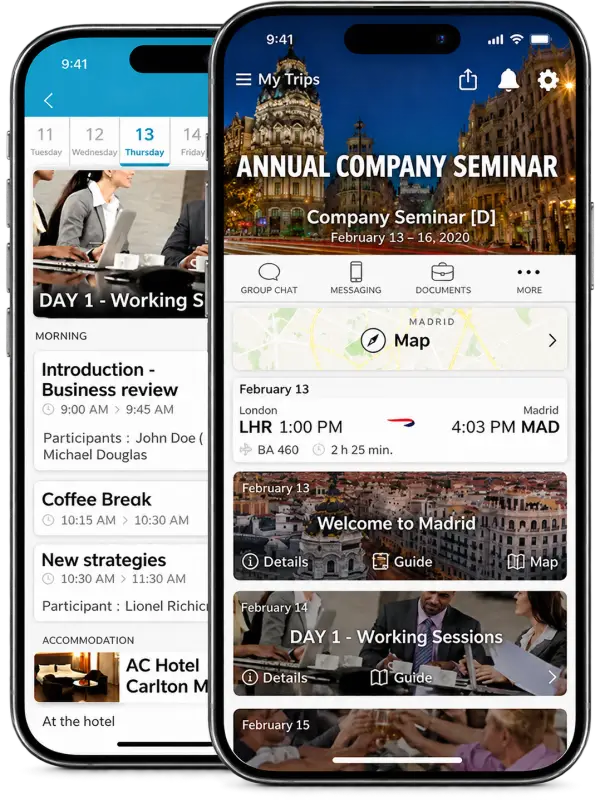
A mobile event app gives every attendee of a corporate event or incentive trip their own agenda, offline access, and real-time updates. Your team builds the whole event and travel program in mTrip’s Agenda Builder, and each attendee gets their own flights, hotels, transfers, and sessions in an app published under your agency’s name.
Trusted by 300+ travel companies across 35+ countries


- Countries
- 35+
- Founded
- 2009
- Travel Brands
- 300+
- Trips Managed/year
- 4M+
- Rated on G2
- 4.9/5
Travel brands powered by mTrip’s integrated platform
- Wings Travel — global travel management company using mTrip’s integrated travel technology platform
- TravelStore — full-service TMC using mTrip’s Itinerary Builder and Mobile App platform
- Schiphol Travel — Netherlands-based travel management company using mTrip’s integrated travel technology platform
- Atlas Travel — corporate travel management company using mTrip’s white-label itinerary and mobile app platform
- Adtrav — specialized TMC using mTrip’s integrated travel technology platform
- TAG — luxury and corporate travel management company using mTrip’s Itinerary Builder and Mobile App
- Fox World Travel — corporate travel management company using mTrip’s integrated mobile and itinerary platform
- ATPI Copastur — Brazil’s leading TMC using mTrip’s white-label travel app and itinerary builder
- Omega World Travel — full-service travel management company using mTrip’s white-label itinerary and mobile app platform
A four-day incentive trip. Three hotels. Twenty-five sessions. One change at 11pm.
Staggered arrivals, multi-hotel rooming, VIP seating, and a session rescheduled the night before departure: a normal week for a MICE agency. On spreadsheets, email threads, and PDFs, a change made at 11pm means rebuilding every document by hand. Here is what the same change costs, depending on what runs your program.
Without mTrip
Spreadsheets and email: every document rebuilt by hand
Someone rebuilds the rooming list, the transfer sheet, and the program, then resends everything by hand, hotel by hotel and group by group. Nobody knows who read the new version.
Generic event app (Cvent, Bizzabo): the sessions update, the travel does not
The session grid updates, but the flights, hotel rooming, and transfers the program actually runs on live somewhere else, so the travel side is still fixed by hand.
Vendor-branded app: the update arrives under someone else’s name
Attendees get the update from somebody else’s app. Your agency’s name is nowhere on it, and the client sees the vendor, not you.
With mTrip
One edit in the mobile event app’s Agenda Builder, and every app, web itinerary and PDF is updated
A planner changes the program once in the Agenda Builder. Every attendee’s white-label app, web itinerary, and branded PDF update from the same agenda, and only the people affected get a push notification.
Why agencies choose mTrip as their mobile event app
mTrip pairs a branded mobile event app for attendees with an Agenda Builder for your planners. Attendees see your name; your team builds and updates the whole program in one place.
Put your agency’s name on every attendee’s phone
Attendees download your white-label app, published under your own developer account on the App Store and Google Play, with your name, logo, and colors. When you deliver a program for a corporate client, each event can be custom branded for that client, as a corporate event app with their logo and colors on it.
Get the features your programs need, built for you
Configuration covers most programs: which modules, content, and travel documents each event shows. When a client needs something the configuration does not cover, mTrip’s in-house team builds it as custom development, scoped and priced per project.
Keep flights, hotels, and transfers in the same program
Flights, hotel rooming, and transfers flow in from Amadeus, Sabre, Travelport, and mid-office systems such as Tourplan, Moonstride, and Ezus. For bookings from anywhere else, the AI Import Wizard reads the confirmation and adds it to the agenda, and bulk import loads a whole program’s participants and items in one go.
Keep attendees informed in your mobile event app, even with no signal
The full agenda and travel documents open with no internet connection, which suits international programs and venues with weak Wi-Fi. Content syncs again as soon as the phone reconnects, so nobody travels with an outdated program.
What attendees get in your mobile event app
A generic event app hands attendees a stranger’s logo and a schedule with no connection to their flight or hotel. mTrip’s mobile event app carries your agency’s name and pairs the agenda with the travel details your program already has.
Personalized attendee agendas
Each attendee receives an email invitation with a personal login and sees only their own program: their sessions, transfer group, hotel, and activities, with the flight and hotel details already attached. VIP tracks and optional activities appear only for the people they concern.
Travel documents in the event app
Flight e-tickets, hotel vouchers, and transfer confirmations are stored next to the agenda, imported from your GDS or mid-office system, so attendees never need a second app or a printed folder at the airport.
Full offline access to the event app
The entire agenda and travel documents open with no internet connection, built for international programs with unreliable connectivity and venues with weak Wi-Fi. Content syncs again as soon as the phone reconnects.
Real-time updates from the event app
A change in the agenda reaches each affected attendee’s phone the moment your planner makes it, with push notifications sent manually or triggered automatically by time, location, or event rule. The rest of the group is left alone.
In-app chat
Attendees message each other, organizers broadcast to groups, and tour leaders manage sub-groups, in the same app as the agenda, so a transfer change or a dinner reminder does not depend on a WhatsApp group.
Your name on the event app
A white-label event app published under your agency’s own developer account. Each event can be custom branded for the client it is run for.

The Agenda Builder behind your mobile event app
mTrip’s Agenda Builder is the planning tool behind the mobile event app. Planners build each program once, importing flights, hotels, and transfers from Amadeus, Sabre, Travelport and mid-office systems such as Tourplan, Moonstride, Ezus, and Juniper, or from any booking document through the AI Import Wizard. The attendee app, web itinerary, and branded PDF all read from that one agenda.
-
Drag-and-drop program planning
Planners organize sessions, transfers, meals, and activities in one multi-day timeline. The same agenda feeds the attendee app, the web itinerary, and the branded PDF program.
-
GDS and mid-office import
Flights, hotels, and transfers booked in Amadeus, Sabre, or Travelport, or in Tourplan, Moonstride, Ezus, and Juniper, land in the agenda as they are confirmed, with no duplicate data entry.
-
AI Import Wizard
For bookings outside the GDS, a hotel confirmation email, a restaurant booking, or a ground operator PDF, the AI Import Wizard reads the document and adds the structured item to the agenda in one click.
-
Branded PDF program
A print-ready program is generated from the same agenda under your identity, or your client’s, so the PDF handed out at the welcome desk always matches what attendees see in the app.
-
Per-participant variants
VIP tracks, optional activities, and different transfer times are set once in the program, and each attendee sees only the version that applies to them.
-
Bulk import for preparation
Planners load a whole program at once, participants and program items together, instead of entering them one by one, so a 300-person congress is prepared in one pass.
One change. Every touchpoint updated.
In mTrip’s mobile event app, one edit in the Agenda Builder updates every attendee touchpoint: the branded app in real time, the web itinerary, a branded PDF in one click, and a push notification to only the attendees affected. A flight landing two hours late is three edits for your planner.
-
Your planner edits the agenda
Move a session, change a venue, reschedule a transfer.
One edit in the Agenda Builder, on the program every channel reads from.
-
Every channel updates: event app, web, PDF
No app update required.
Each affected attendee’s app updates in real time, the web itinerary refreshes for anyone using it instead, and a branded PDF with the latest agenda is one click away.
-
Only the right people hear about it
A push notification to the attendees affected.
The whole group is not woken up for a change that touches twelve people.
Use cases
Who runs events on the mTrip mobile event app
Four kinds of organizers use mTrip’s mobile event app: MICE agencies running corporate event programs for clients, incentive travel companies rewarding top performers, PCOs managing conferences with flights and hotel allocations, and tour operators adding events to the platform they already use. All four work from the same Agenda Builder, branded app, and GDS and mid-office integrations.
MICE agencies: run the whole client program under one brand
Run the corporate event program for clients from one account: travel logistics, event agenda, and attendee experience together. Each event carries the client’s logo and colors, as a corporate event app in their name, while your team keeps control of the program. The same account then handles the next client’s event with its own branding.
Incentive travel companies: an incentive travel app that gives top performers a personal trip
Each winner opens a personal trip: their own flights and hotel, the activities they chose, destination discovery content, and VIP tracks for top performers, in one branded incentive travel app. Last-minute changes reach them in the app without a round of emails.
Also built for
PCOs: manage the conference and the journey together
Handle participant flights, hotel allocations, and airport transfers alongside the conference agenda, in one branded attendee experience. Staggered arrivals and transfer groups sit in the same timeline, parallel session tracks show each attendee their own, and flights and hotel data come from your GDS and mid-office system.
Tour operators adding events: add MICE to the platform you already use
Tour operators already running leisure or business travel on mTrip add MICE on the same platform, with no separate tool or login. Same Agenda Builder, branded app, and integrations as your other trips, one login for leisure, business travel, and MICE programs, and existing integrations carry over.
Works with the systems you already use
mTrip connects to your GDS, mid-office, and booking platforms, so your team isn’t re-keying data your systems already have.
GDS feeds into the event app
Flights, hotels, and transfers flow in from the GDS platforms your team already books through:



Mid-office
Native integrations with the mid-office platforms MICE agencies and tour operators run on:
- Tourplan
- Moonstride
- Ezus
- Juniper
- Facilitatrip
Imports & automation
Everything that is not in a GDS still lands in the agenda:
- AI Import Wizard
- Excel
- API
- Zapier
Developers can start from the mTrip developer pages, or book a demo to see your own systems connected.
mTrip’s mobile event app vs. generic event platforms
Cvent and Bizzabo are built for corporate teams running their own conference. mTrip is built for agencies managing both the travel and the event program for someone else.
| Capability | Cvent, Bizzabo, Swapcard | mTrip |
|---|---|---|
| White-label app published under your own App Store account | Higher plans or enterprise pricing, complex setup | White-label offer |
| GDS integration (Amadeus, Sabre, Travelport) | No | Yes |
| Travel documents (flights, hotels, transfers) in the attendee app | No | Yes |
| Mid-office system integration (Tourplan, Moonstride, and similar) | No | Yes |
| Drag-and-drop multi-day agenda builder | Sessions only, no travel data | Travel-aware |
| Per-attendee personalized agendas, including travel details | Sessions only | Yes |
| Full offline mode: agenda and travel documents with no internet required | Partial cache at best | Yes |
| Built for agencies and PCOs managing client programs | Built for corporate teams | Yes |
| Conference registration, ticketing & lead retrieval | Core strength | Not offered |
White-label app availability for Cvent, Bizzabo, and Swapcard varies by contract tier and requires its own store-publishing setup; confirm current requirements with their sales teams.
Pricing, setup time, and what the mobile event app covers
Two offers, both priced per participant per event: Trip Agent to start the same day, or your own white-label app live in 2 to 3 weeks. These are the answers a project manager looks for before booking a demo.
Trip Agent
The entry point for the mobile event app
- Shared platform and app, branded with your logo and colors
- Priced per participant per event
- No setup fee by default, no long-term commitment
- Start sending programs the same day you subscribe
Fully white-label app
Your own app on the stores
- Published under your Apple and Google developer accounts, your name and icon
- Priced per participant per event
- Setup fee scoped to your project, one-year engagement
- Typically live in 2 to 3 weeks, depending on integrations; if your event is close, say so on the demo request
Which languages
9 languages
- English, French, German, Spanish, Italian, Portuguese, Dutch, Polish, and Japanese
- Data encrypted in transit and at rest, GDPR-compliant policies, documented in the Trust Center
What mTrip is not
Not a registration platform
- Not a conference registration, ticketing, or lead retrieval platform
- Built for MICE agencies, incentive travel companies, and PCOs that run the travel and the program for clients
Questions MICE agencies ask
Frequently asked questions about the mobile event app
General & Overview
What is a mobile event app, and what does mTrip actually do?
A mobile event app puts a corporate event, incentive trip, or conference program on each attendee’s phone. mTrip’s mobile event app is white-label: a branded mobile and web experience that gives each attendee a personalized agenda, full offline access, and real-time updates under the agency’s own name. Behind it sits the Agenda Builder, the tool your planners use to build and update the program. Change the program once, and every attendee’s app updates with it.
How is mTrip different from Cvent, Bizzabo, or Swapcard?
mTrip is built for agencies that run the travel and the event program for clients, while Cvent, Bizzabo, and Swapcard are built for corporate marketing teams organizing their own conferences: registration, ticketing, and lead retrieval. None of them handle travel logistics: no GDS integration, no hotel rooming lists, no multi-country transfers, no travel documents in the attendee app. mTrip puts all of it in one branded app.
What types of events and group sizes does mTrip support?
mTrip scales from small executive retreats of around 20 participants to incentive programs and conferences with 500 or more, across multiple venues and countries. The platform is built for multi-hotel, multi-venue programs with staggered arrivals, sub-group differentiation, and parallel session tracks, and it has no upper limit on program items or attendee records. mTrip is built for agencies and operators of any size, and Trip Agent is the entry offer for smaller teams and individuals.
Branding & the App
Can I fully brand the event app with my agency’s identity?
Yes. mTrip’s app is a white-label event app, published on the App Store and Google Play under the agency’s own developer account, with the agency’s name, logo, and colors. Attendees download the agency’s app, not an app carrying mTrip’s name. Each event can also be custom branded for the corporate client it is delivered for, with that client’s logo and colors on their program.
Does the attendee app work without an internet connection?
Yes. The app is offline-first: attendees can open their full event agenda and travel documents with no internet connection. That matters for international incentive programs with unreliable connectivity, or venues with poor Wi-Fi. Content syncs again automatically once the device reconnects.
How do attendees get access to their program?
Each attendee receives an email invitation from the agency with a personal login. They download the branded app from the App Store or Google Play, sign in, and see only their own program. Anyone who prefers not to install an app opens the same program as a web itinerary.
How do push notifications and in-app chat work?
Push notifications go out manually, or automatically when a time, location, or event rule is met, and you can send them to only the attendees a change affects. In-app chat lets attendees message each other, organizers broadcast to groups, and tour leaders manage sub-groups.
Can I use mTrip as an incentive travel app?
Yes. Incentive travel companies use mTrip as their incentive travel app. Each winner gets a personal agenda with their own flights, hotel, transfer group, and optional activities. Push notifications reach only the people a change affects. The app carries your brand or your corporate client’s.
Is mTrip a corporate event app for companies that run their own events?
mTrip is used by MICE agencies, incentive travel companies, and PCOs, and corporate teams are welcome to book a demo to see how it fits their own events. An agency can custom brand each event for its client. The company’s employees see their own logo and colors on their program, and the agency runs the travel and the program behind it.
Integrations & Platform
Does mTrip connect to Amadeus, Sabre, and our mid-office system?
Yes. mTrip integrates with Amadeus, Sabre, and Travelport for GDS data, and with mid-office platforms including Tourplan, Moonstride, Ezus, Juniper, and Facilitatrip. Flights, hotel reservations, and transfers flow directly into the Agenda Builder timeline. For bookings outside the GDS, such as a hotel confirmation email, a restaurant booking, or a ground operator PDF, the AI Import Wizard reads the document and adds the structured data to the agenda in one click. To prepare a whole program at once, bulk import loads participants and program items together.
Can I use mTrip for MICE alongside our existing leisure or corporate travel programs?
Yes. mTrip is one platform, not a separate MICE tool bolted onto another product. The same Agenda Builder, branded app, and integrations that run a MICE program also handle leisure itineraries and business travel. One login, one set of integrations, regardless of trip type.
Pricing, setup & fit
How much does the mobile event app cost?
Pricing is per participant per event, not per agent seat. Trip Agent has no setup fee by default and no long-term commitment. The white-label app has a setup fee scoped to your project and a one-year engagement. mTrip has no public price list, so the team scopes it with you during a demo.
How long does it take to launch a branded mobile event app?
With Trip Agent, you start sending programs the same day you subscribe. A white-label app typically goes live in 2 to 3 weeks, depending on the integrations you need. If your event date is close, say so when you request the demo so the team can plan the timeline around it.
Which languages does mTrip support?
mTrip supports 9 languages: English, French, German, Spanish, Italian, Portuguese, Dutch, Polish, and Japanese.
Does mTrip handle conference registration, ticketing, or lead retrieval?
No. mTrip is not a registration, ticketing, or lead retrieval platform, so keep using your registration tool for that. mTrip adds the travel side and the program: flights, hotels, transfers and documents for clients, in one branded app.
How does mTrip handle attendee data and security?
mTrip encrypts data in transit and at rest and maintains GDPR-compliant policies. The company is registered with the UK Information Commissioner’s Office, and its security documentation is available in the Trust Center.
Ready when you are
Put your brand in every attendee’s pocket
See the mobile event app and the Agenda Builder in action. We’ll walk through a real program, from agenda to live attendee app, in under 30 minutes.
300+ clients. 35+ countries. 4M+ trips a year. Rated 4.9/5 on G2.